Key Concepts
This page defines the core terminology, object model, and proof types you will encounter when integrating Polyguard trust checks into your product.
Terminology
Platform Operator
A customer of Polyguard Inc. who provides white-label or co-branded trust checks embedded in their own (or their customer's) business workflows. Platform Operators interact with Polyguard through the partner management APIs and SDKs.
Business User
A customer of the Platform Operator who uses trust checks to secure their transactions with End Users. Business Users create and manage trust checks -- directly or indirectly -- via an integrated management experience provided by the Platform Operator.
End User
An individual who uses a first-party or third-party Polyguard mobile application to verify their identity while completing workflows within the platform. End Users hold their own credentials on-device and present proofs during trust checks.
Polyguard System
Either the primary Polyguard SaaS environment running at api-global.polyguard.ai, or a self-hosted copy of the Polyguard software operated by a Platform Operator at a well-known endpoint. See Multitenancy & Regionalization for details on deployment models.
PolyUser
The portable identity object representing a verified individual across all Polyguard applications. A PolyUser's identity is atomic and singular -- it is the same identity regardless of which mobile application the Mobile SDK is embedded within.
Object Model
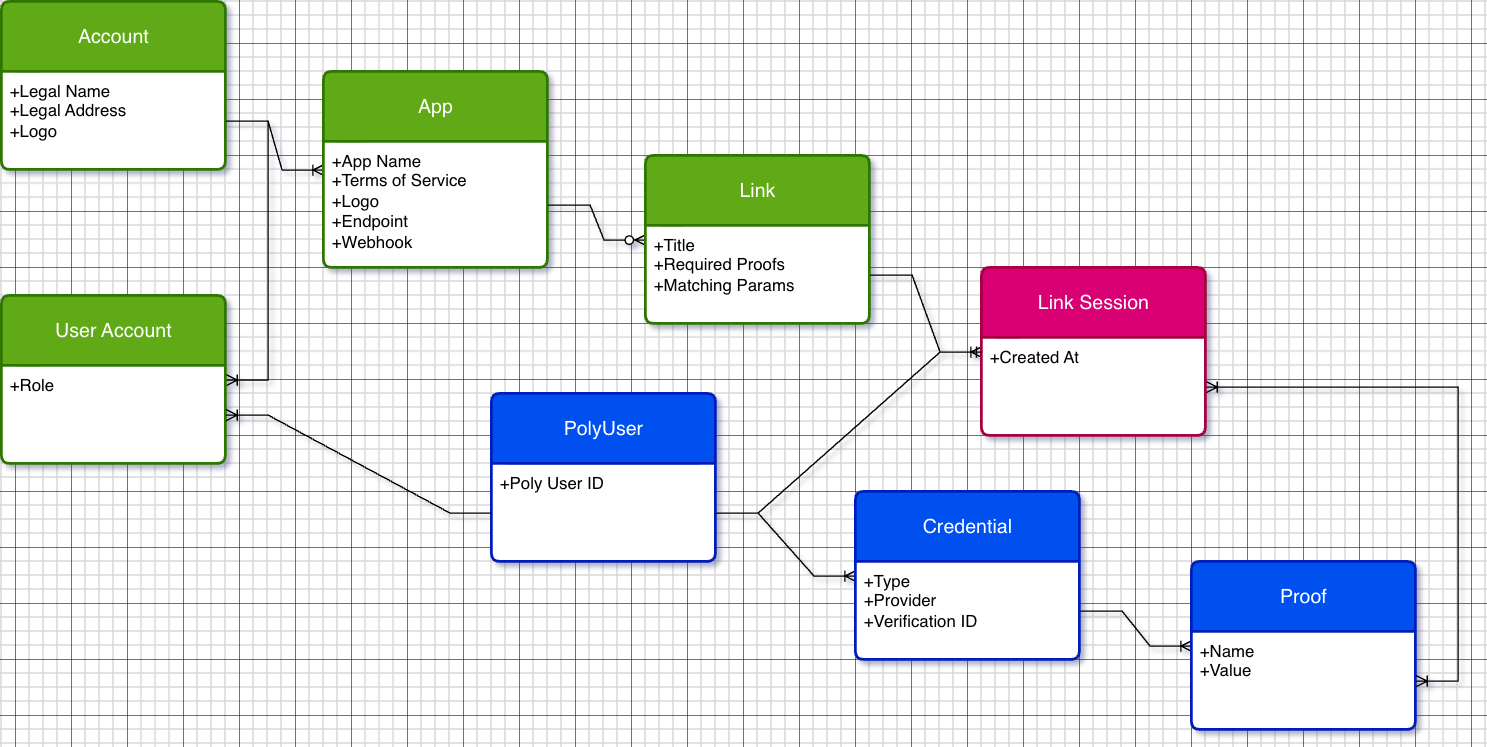
The diagram below shows the entity relationships within the Polyguard system.
Entities
| Entity | Key Attributes | Description |
|---|---|---|
| Account | Legal Name, Legal Address, Logo | The top-level organizational entity for a Platform Operator or Business User. |
| App | App Name, TOS, Logo, Endpoint, Webhook | A configured application within an Account. Each App defines its own terms of service, branding, API endpoint, and webhook URL. |
| Link | Title, Required Proofs, Matching Params | A reusable trust check configuration. Specifies what proofs an End User must present and any matching parameters for the session. |
| Link Session | Created At | A single execution of a trust check against a Link. Each session produces its own event logs and transaction affidavit. |
| PolyUser | Poly User ID | The identity object for an End User. Connects to Credentials and Link Sessions. |
| User Account | Role | The join between a PolyUser and an Account, with a role assignment (e.g., admin, member). |
| Credential | Type, Provider, Verification ID | A verified identity credential held by a PolyUser (e.g., a government ID or phone number). |
| Proof | Name, Value | A specific verified fact derived from a Credential (e.g., legal name, country, age). |
Relationships
- An Account contains one or more Apps.
- Each App defines one or more Links.
- Each Link can be executed as multiple Link Sessions (Links are reusable by default).
- A PolyUser holds Credentials, which produce Proofs.
- A PolyUser participates in Link Sessions.
- A User Account connects a PolyUser to an Account with a specific role.
Required Proofs
During a trust check, the End User presents cryptographic proofs drawn from credentials stored in their mobile device's secure enclave. Some proofs are pre-established (imported during identity setup), while others are generated dynamically during the trust check itself.
Identity Verification Partners
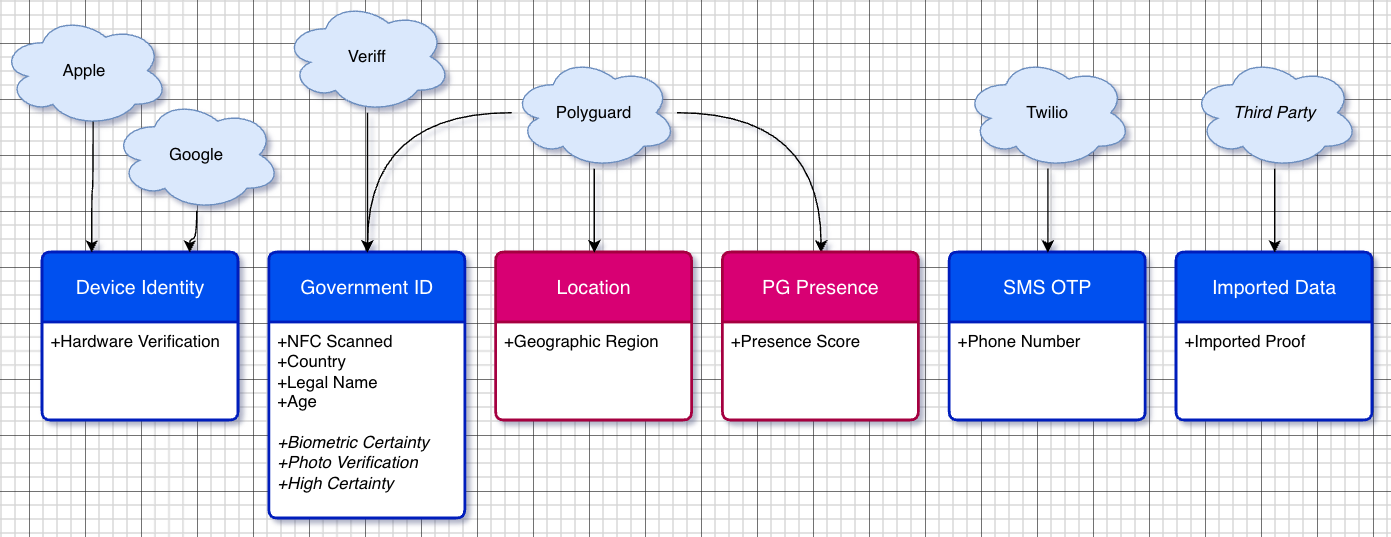
Government ID verification is performed through one of three integrated identity verification partners: Veriff, Persona, or Certn. The specific partner used depends on configuration and regional availability. From the SDK integration perspective, the choice of provider is transparent -- the proof types and data formats are identical regardless of which partner performs the underlying verification.
Proof Types
| Proof Type | Sub-Proofs | Trust Chain Source | Timing |
|---|---|---|---|
| Device Identity | Hardware Verification | Apple (AppAttest, DeviceCheck), Google (Play Integrity) | Pre-established |
| Government ID | NFC Scanned, Country, Legal Name, Age, Biometric Certainty, Photo Verification, High Certainty | Veriff, Persona, or Certn | Pre-established |
| Location | Geographic Region | Polyguard | Dynamic (during trust check) |
| PG Presence | Presence Score | Polyguard | Dynamic (during trust check) |
| SMS OTP | Phone Number | Twilio | Pre-established |
| Imported Data | Imported Proof | Third Party | Pre-established |
Pre-Established vs. Dynamic Proofs
Pre-established proofs are credentials that the End User has already verified and stored on their device. During a trust check, the mobile PKI (unlocked via facial biometric verification) signs these proofs for presentation.
Dynamic proofs are generated in real time during the trust check itself:
- Location -- GPS/GNSS-based geographic location captured at the moment of the trust check.
- PG Presence -- Optical-latency-based presence verification confirming the End User is physically present.
Derived Proofs
Some proof types are computed from other proofs rather than directly sourced:
- Biometric Certainty -- Derived from the facial biometric match against the credential photo.
- High Certainty -- Combines document verification with geographic location cross-checks.
- Photo Verification -- Derived from matching the credential photo to the live facial scan.
These derived proofs enable scoring workflows where the Platform Operator can set thresholds appropriate to their risk tolerance.